> For the complete documentation index, see [llms.txt](https://docs.metapool.app/master/llms.txt). Markdown versions of documentation pages are available by appending `.md` to page URLs; this page is available as [Markdown](https://docs.metapool.app/master/meta-pool-ecosystem/stake/delayed-unstake.md).
# Delayed Unstake
Traditional Unstake
**NEAR Chain**: Delayed Unstake is the default form of unstaking from any validator on the NEAR protocol: due to the design of the network, validators wait 4 - 6 epochs (***48-72 hours***) before releasing the staked funds back to the user. Delayed unstaking is **fee free** for all users. During the unstake period you will not generate rewards.
**AURORA Chain**: Delayed unstake that takes a ***maximum of 4 days***, there are no fees, but during the unstake period you will not generate rewards. $stAURtokens are managed and holded by the $stAUR contract in a non-custodial service. Any user is able to redeem their $AURORA tokens through the unstake service at any time.
**ETHEREUM Chain**: Delayed unstake that takes ***aprox. of 14 days***, there are no fees, but during the unstake period you will not generate rewards. Any user is able to redeem their $spETH tokens through the unstake service at any time.
**ICP Chain:** Meta Pool estimates a maximum time for ustake, but the ***delayed unstake time cannot be predicted*** before the action is performed, due to how the ICP protocol works. Prior to delayed unstaking there is no way to get an accurate time estimate, because the withdrawal orders are queued among all the requests to be processed. But when the ICP staked volume increases, all those orders are filled and that time decreases substantially. During the unstake period you will not generate rewards
**STORY PROTOCOL Chain**: Delayed unstake that takes ***aprox. of 14 days***, there are no fees, but during the unstake period you will not generate rewards. Any user is able to redeem their $stIP tokens through the unstake service at any time.
**SOLANA Chain:** see [Unstake Leveraged mpSOL](/master/meta-pool-ecosystem/leveraged-stake-aggregator/unstake-leveraged-mpsol.md)
**To withdraw your funds from Meta Pool using Delayed Unstake simply:**
1. **Token selection:** Choose the token of your preference. Note that by default the staking is in the $IP token, but make sure to select the desired token.
1. Select the ***Unstake*** option and then the ***Delayed Unstake*** option.
2. Enter the **amount of the LST** (stIP, stNEAR, stAUR, spETH, mpSOL or stICP) you wish to unstake. View the estimated time to make the withdrawal.
3. Click the **Unstake** button and approve the transaction.
1. Now you can view the **status of your delayed unstake** and the **remaining time** to make the withdrawal (Some are seen directly in the Withdraw section and/or in the Dashboard section.).
1. After the specified time, you can **make the withdrawal**. Your transaction will be confirmed by the blockchain, you'll have your original Digital Asset + staking rewards on your wallet.
{% hint style="warning" %}
NEAR: If there is a delayed unstake in progress and another is requested, note that the amounts are added, but the time is reset for both.
{% endhint %}
{% hint style="warning" %}
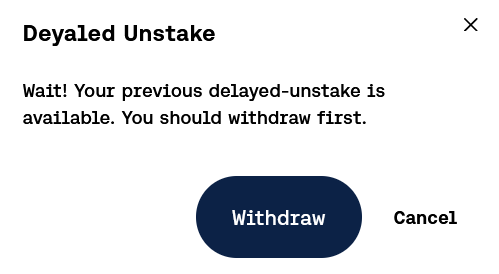
Another delayed unstake cannot be requested, if there is a withdrawal pending to be executed (Not for Story Protocol, there can be up to 4 at the same time.).
{% endhint %}
{% hint style="success" %}
The delayed unstake status can be also view in the dashboard section.
{% endhint %}
## Add Reminder
If you press the "**Add reminder**" button in your Pending Withdraw, you will be given an option to add a reminder to your Google calendar.