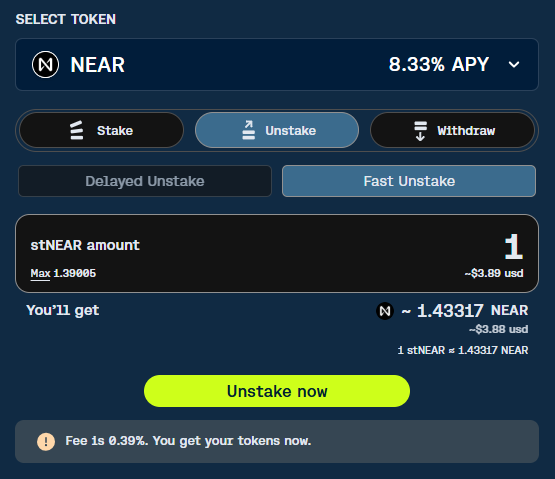
Fast Unstake
There are 2 options to unstake in Meta Pool: you can:
- Liquid Unstake (called Fast Unstake)
- Traditional Unstake (called Delayed Unstake).
Steps to follow to Fast Unstake
Section titled “Steps to follow to Fast Unstake ”You may unstake your LST (Liquid Staked Token - stNEAR, stAUR, spETH, stIP ) immediately by paying a small fee and using the Liquid Unstake feature. Doing this you are actually swapping your LST token for the original Digital Asset + staking rewards. This is made possible thanks to Meta Pool liquidity pool.
To Fast Unstake simply:
- Select the Token
- Then select the Unstake option.
- Select then the Fast Unstake option.
- Enter the amount of the LST (stNEAR, stAUR, spETH, stIP) you wish to unstake.
- Review the current Liquid Unstake Fee and decide whether you want to proceed.
- Click the Unstake now button and approve the transaction.
- After a few seconds, your transaction has been confirmed by the blockchain, you’ll have your original Digital Asset + staking rewards on your wallet.