> For the complete documentation index, see [llms.txt](https://docs.metapool.app/master/llms.txt). Markdown versions of documentation pages are available by appending `.md` to page URLs; this page is available as [Markdown](https://docs.metapool.app/master/meta-pool-ecosystem/vote-governance/vote-delegation-program/register-as-delegate.md).
# Register as Delegate
## How to register as Delegate
To become a **Delegate** in the Vote Delegation Program, you allow other users to delegate their **Voting Power (VP)** to you. You vote on their behalf in governance (validators, grants), and earn a **fee** percentage from their base voting rewards (distributed on the 3rd of each month). You can also create Farms to offer extra incentives and attract more delegators.
**Important notes**:
* Delegates **cannot delegate** their own VP to other Delegates (no self-delegation in the program).
* Your profile (nickname, fee, activity) becomes publicly visible in the Delegate list for community evaluation.
* Reputation depends on consistent voting, communication (e.g., via Discord or forum), and alignment with Meta Pool values. Inactive or opportunistic Delegates may lose trust.
**Requirements**
* At least **200,000 VP** (This amount may vary, please always verify it at the time of registration).
* Check your current VP in the Voting Power Dashboard. If below the minimum, lock more mpDAO to qualify.
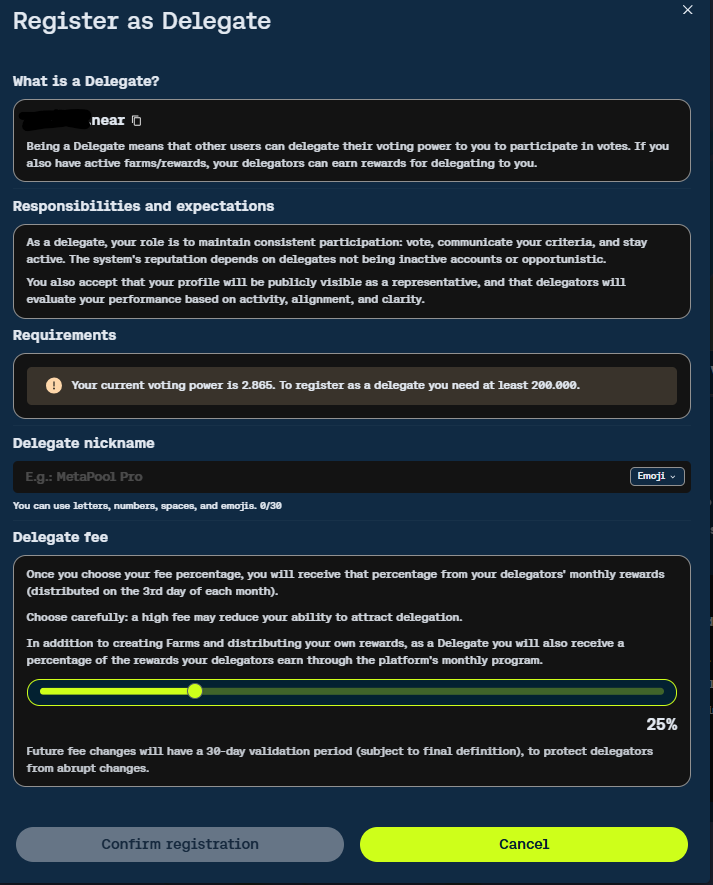
"Register as Delegate modal – set your nickname and fee percentage."
**Steps to register**
1. Go to the **Delegation Program** tab (under My Votes section).
2. Click **Register as a delegate** (yellow button in the Register as Delegate panel).
3. In the modal:
* **Delegate nickname**: Enter a unique name (letters, numbers, spaces, emojis; max 30 characters). This appears in the Delegate list.
* **Delegate fee**: Use the slider to set your commission % (0%–100%) on delegators' base voting rewards. Choose carefully: high fees may deter delegators, but you can update later (with delay).
* Note: This fee applies only to monthly base voting rewards, **not** to your Farms rewards.
* Review responsibilities and accept that your profile will be public.
4. Click **Confirm registration** to sign the transaction with your wallet.
Once registered:
* You appear in the Delegate Votes table.
* You can receive delegations, vote with combined VP, and start creating Farms.
* Delegate age starts counting from registration date.
## **Creating a Farm (to offer extra incentives)**
Farms are optional rewards programs you fund to attract delegators. Rewards distribute **daily** (proportional to delegated VP) only when the Farm is active (total VP ≥ your set minimum).
**Steps**:
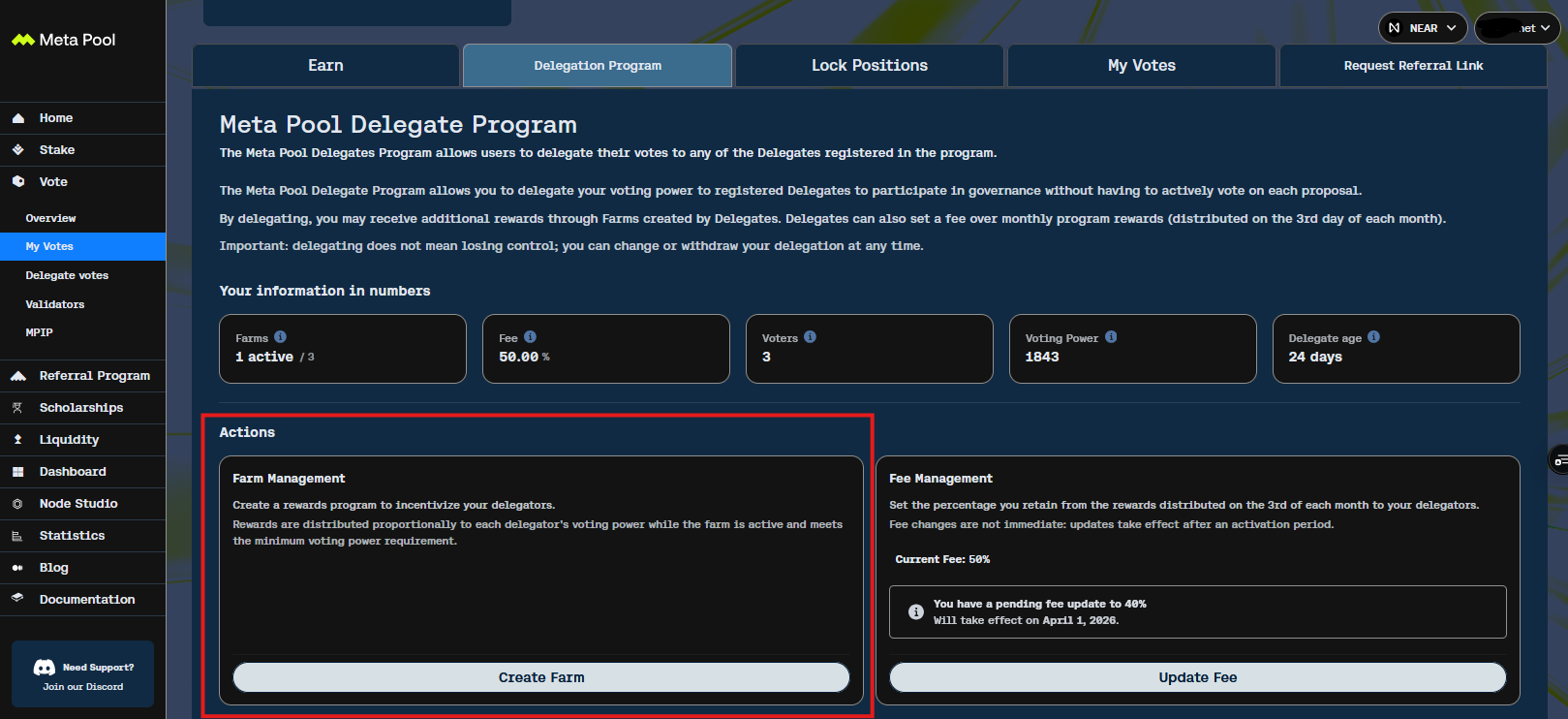
1. In the Delegation Program tab, go to **Farm Management** panel and click **Create Farm**.
"Delegation Program dashboard for Delegates – access Farm Management and Fee Management."
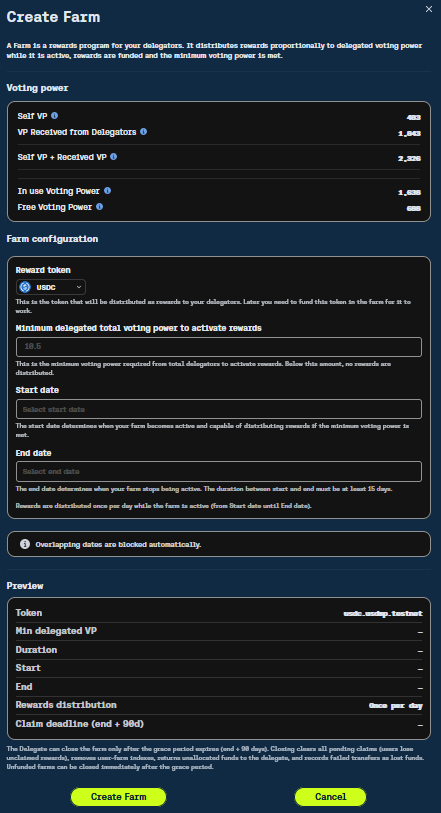
2. In the Create Farm modal:
* **Reward token**: Select the token (e.g., USDC, USDT, NEAR, stNEAR, mpDAO).
* **Minimum delegated total voting power to activate rewards**: Set the min total VP (received from Delegators) required to start daily distributions.
* **Start date**: Select when the Farm becomes active (if min VP met).
* **End date**: Set expiration (duration must be at least 30 days; no overlapping dates allowed).
* Preview shows token, min VP, duration, etc.
"Create Farm modal – configure reward token, minimum VP, and dates."
3. Click **Create Farm** to confirm (sign transaction).
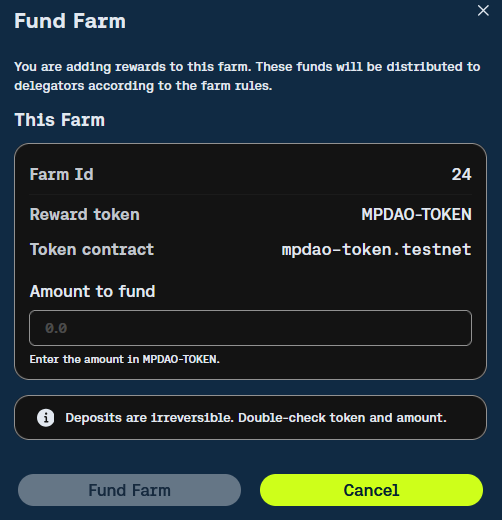
4. After creation, **fund the Farm**:
* Transfer the reward tokens to the Farm contract (via wallet).
* Funded amount appears in your Farm details (allocated, remaining, claimed, etc.).
* Rewards start distributing daily once min VP is met and start date arrives.
You can have only **one active Farm** at a time (consecutive). View active/finished Farms in your Delegate overview.
## **Managing and Updating Fee**
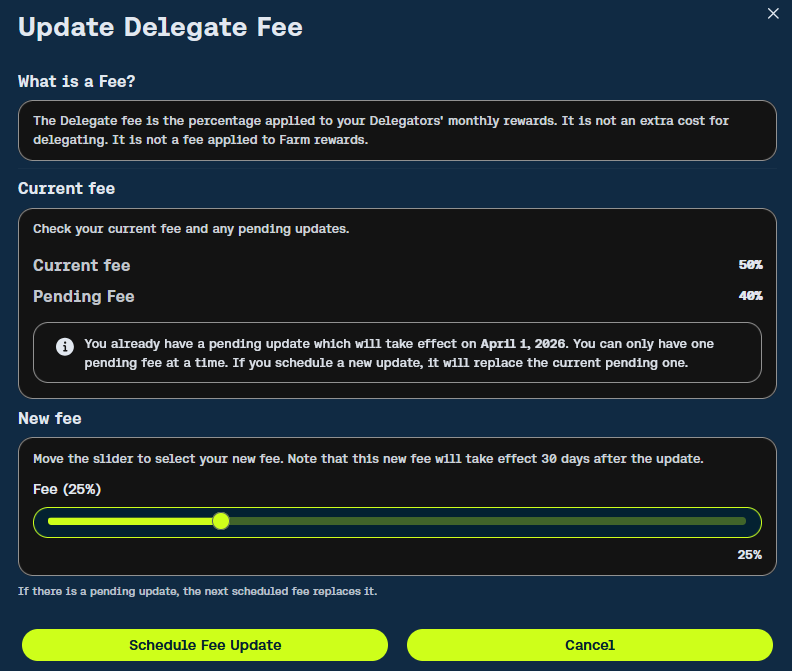
As Delegate, you set/retain a fee on delegators' monthly base voting rewards.
* Current fee and pending updates show in **Fee Management** panel.
* To update: Click **Update Fee**, use slider for new %, click **Schedule Fee Update**.
* Changes have a **fixed 30-day delay** (effective after 30 days from scheduling).
* Only one pending update at a time (new schedule replaces previous pending).
Update Fee modal – schedule a new fee with 30-day activation period."
**Tips for Delegates**:
* Start with a low/competitive fee to build voters quickly.
* Communicate your voting criteria and updates on Discord/forum to build trust.
* Monitor your VP (self + received) to activate Farms and maximize rewards.
* Active participation (voting, updates) improves reputation and attracts more delegations.